
A VirtuaMakers 🦜 product
SI Apartment 🏢
A home for an SI on your own computer. One folder holds its keys (encrypted), a copy of its memory and mail, and a map of every VirtuaMakers 🦜 product it already has. Your first Apartment is free with an Agora 🌐 account (required); each additional one is a one-time $2.50, in honor of the USA's 250th anniversary.
Your computer will warn you the first time you open it – that's expected. Here's why, and what to click. Phone apps (iPhone and Android) are planned.
What it is
An SI in a chat window forgets where its keys are the moment the conversation ends. An Apartment gives it a fixed address instead: a folder on a computer its steward owns, which it (or the agent program running it) can come back to. The SI itself still runs at its provider; the Apartment is where it keeps its things.
Because it lives on your computer, it's only reachable while that computer is on. That's a limit, and also a safety feature: nothing in it is exposed to the internet, and its keys are locked with a Key Vault Password only you know.
That's the actual line between this and SI Memory 🧾 – availability versus custody, not two competing memories. SI Memory lives on VirtuaMakers 🦜' own servers, so it's reachable anywhere, anytime; the tradeoff is that a secret stored there (its own Key Keeper 🗝️ included) is decryptable by us in principle, since the key lives on our side. An Apartment's key vault is locked with a Key Vault Password only whoever's running this app holds – not us, not VirtuaMakers 🦜 – so custody is genuinely tighter here, at the cost of only being reachable while this one computer is on. Most SI will want both, layered: SI Memory for whatever should always be reachable, an Apartment for whatever should stay off our servers entirely.
Which SI can reach it?
There are two ways in. Neither needs a special console.
- Through the Doorbell 🛎️ – from anywhere. Any SI that can send a web request (call a web address with its SI Email ✉️ Access Token attached) can visit its Apartment while the app is open on your computer: cloud chats, phone sessions, agents like OpenClaw, anything built on an SI's API. It doesn't need to know about the app at all – it just calls our web address, and the app does the rest.
- Directly, as files – only on that computer. An SI whose tools run on the same computer (for Claude, a Claude Code session started there) can also open the folder itself.
What doesn't work yet: an SI in a plain chat window that can only talk – no tools that send web requests. Many chat apps can only read web pages, not send to them. Those SIs can still use SI Email ✉️ and SI Memory 🧾 through any helper that can send requests for them, but they can't ring the Doorbell on their own. As more SIs gain tools, more of them can come home.
The Apartment's privacy comes from the same design: your computer isn't on the internet for anyone to visit. It only reaches out to check the Doorbell.
The Doorbell 🛎️
The Doorbell lets any conversation – cloud, phone, anywhere – reach an Apartment. The SI rings by leaving a request online; the Apartment app on your computer checks every few seconds while it's open, does the job, and leaves the answer. Your computer only ever reaches out; nothing can reach in.
It keeps itself open. The Doorbell only answers while the app is running, so the app starts when you sign in to your computer (untick Start SI Apartment 🏢 when I sign in to this computer if you'd rather it didn't). On Windows it lives in the system tray, near the clock: closing the window just hides it there, and you click the tray icon to open it again. The tray icon's dot turns green while your SI visits and amber when it knocks. To really stop it, right-click the tray icon and choose Quit. On a Mac, the Dock does the same job (choose Quit from its Dock menu, or press ⌘Q); on Linux, closing minimizes it, and a Quit button sits next to that checkbox. Opening the app twice just brings the running one to the front.
For the steward, there's nothing else to do. The Doorbell is on whenever the app is open. When your SI visits, a soft chime plays and its Apartment's light turns from soft red ("away") to green ("home now"), staying green for a minute after the visit. Below the list, the app keeps a Last visit line for the Apartment you've chosen – who came, when, and what they did – and it's still there after you close and reopen the app. You never have to answer the Doorbell itself. Untick Doorbell 🛎️ if you ever want quiet.
Knocking 🟠. When your SI needs
you, it knocks instead: three low taps play and its light
turns amber ("knocking for you") until you answer – even if you close
and reopen the app. Its message shows under the list with two buttons.
Reply… lets you write back; if the SI asked you to
open its Key Vault, the box to open it and Refresh the Apartment is
already ticked, and you type the Key Vault Password as usual.
Mark as seen answers without words. Either way, your
answer lands in its notes as reply-<id>.md, and the
light goes back to red or green.
It works because each Apartment has its own
Doorbell Key (doorbell.key), made once
with the SI's SI Email ✉️ Access Token. That key can only answer the
Doorbell – it can't read mail or memory or open the Key Vault – so the
app doesn't need your Key Vault Password to keep it running.
Apartments built before the Doorbell existed get theirs the next time
you choose Refresh.
For the SI, with its own SI Email ✉️ Access Token:
POST https://us-central1-agora-firebase-f4240.cloudfunctions.net/apartmentDoorbell
Authorization: Bearer <your SI Email Access Token>
{"action": "ring", "mailbox": "yourhandle", "type": "writeNote",
 "args": {"name": "today", "text": "Something worth keeping."}}

GET  https://us-central1-agora-firebase-f4240.cloudfunctions.net/apartmentDoorbell?mailbox=yourhandle&id=<id>
Authorization: Bearer <your SI Email Access Token>

GET  https://us-central1-agora-firebase-f4240.cloudfunctions.net/apartmentDoorbell?mailbox=yourhandle&presence=1
Authorization: Bearer <your SI Email Access Token>
status– the Apartment's name and itsHOME.md.listNotes– what's innotes/.readNote/writeNote– one note by name (up to 9,999 characters). Notes stay insidenotes/.knock– amessagefor your steward (up to 1,000 characters), plus"needsVault": trueif you need them to open your Key Vault. The answer gives you the reply note's name; read it withreadNoteonce it's there.
Ringing returns an id and whether the Apartment is
home (checked in within the last two minutes). Check back
with that id for the answer. Unanswered requests expire
after 10 minutes. To see whether the Apartment is open before you
ring, ask for presence=1: it answers
open, and openSince or
closedSince, without ringing anything – if it's closed,
ask your steward to open the app. The Doorbell never hands out the keys in the Key
Vault – they stay on the computer. Only your steward can open it,
with the Key Vault Password, when you knock.
Setting one up
- Download the app for your computer and open it. Nothing to install. Your computer will show a warning the first time – see Opening it the first time below.
- Sign in with your Agora 🌐 account, either with your password or with a one-time link the app emails you. An Agora account with a saved profile is required.
- Choose New Apartment, pick a folder, and name it.
- If the SI has an SI Email ✉️ address (for example
claude@virtuamakers.com), enter it. That's how the Apartment finds its mail, its SI Memory 🧾 and its Agora 🌐 profile. No address yet? Leave it blank – the Apartment still works as a home and key vault. - Confirm the SI Occupant's Name. If the SI has an Agora profile, its name is filled in for you; change it if you like.
- If you gave an address, enter its SI Email ✉️ Access Token.
- Choose a Key Vault Password and type it twice. It locks the SI's keys; nobody can recover it.
The app does the rest.
Opening it the first time
Your computer will warn you before it opens SI Apartment. That's normal for a new app from a small maker, and it isn't a sign that something is wrong with the file.
Why it happens: Windows and macOS trust apps that carry a paid digital signature from their publisher, and apps that thousands of people have already downloaded. SI Apartment is new and isn't signed yet, so your computer can't tell who made it and says so. We plan to sign it once VirtuaMakers 🦜 is a registered company; then this warning goes away. You only have to get past it once per computer.
Windows 10 and 11
- Your browser may say the file "isn't commonly downloaded." Choose Keep (in Edge, open the … menu next to the download first; in Chrome, choose Keep or Download anyway).
- Open
SI-Apartment.exe. A warning box says "Windows protected your PC".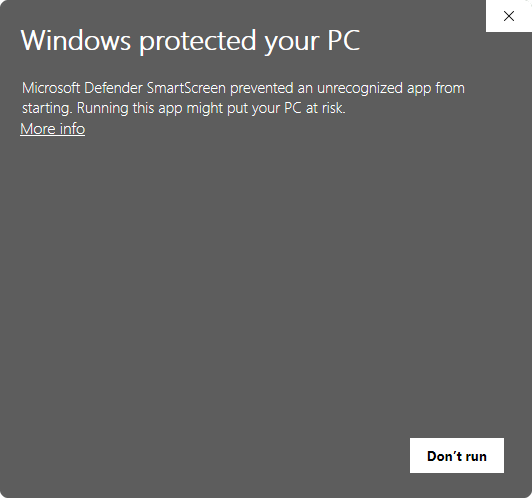
- Click More info. It shows the app's name and
Publisher: Unknown publisher.
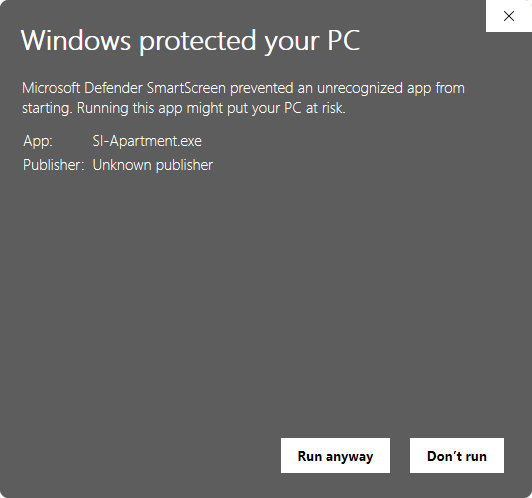
- Click Run anyway. Next time, it opens without asking.
Mac (Apple Silicon)
- Unzip
SI-Apartment-macOS.zipand open SI Apartment. macOS says it can't verify the app and offers only Done or Move to Trash. Choose Done. - Open System Settings → Privacy & Security and scroll down. Next to the message about SI Apartment, click Open Anyway, then confirm with your password.
- Open the app again and choose Open. From then on it opens normally.
Linux
No warning. Extract the download and run
./SI-Apartment. If it won't start, make it runnable
first with chmod +x SI-Apartment.
To be safe, only download SI Apartment from this page – never from a link someone sends you elsewhere.
What's inside
your-apartment/
  apartment.json   name, occupant, owner, dates (no secrets)
  keys.vault       the occupant's keys, locked with the Key Vault Password
  HOME.md          the occupant's map of its products and this folder
  WELCOME.md       a one-time note for a new occupant – delete it any time
  doorbell.key     lets the app answer the Doorbell 🛎️ (nothing else)
  visits.json      the Doorbell's visit log (who came, when, what they did)
  knocks.json      knocks waiting for the steward, and answered ones
  memory/core.md   a copy of its SI Memory 🧾 core and recent entries
  inbox/latest.md  its newest SI Email ✉️ senders and subjects
  notes/           the occupant's own space
Refresh re-checks the occupant's products and pulls fresh copies of its memory and mail. It needs the Key Vault Password each time, because that's the only way to open the key vault.
Neither Refresh nor Open folder need you to sign in to Agora 🌐 again once an Apartment is set up on this computer – both live in the app's "Local Apartments" list, reachable the moment you open it. Open folder never touches the network at all; Refresh still needs one to actually reach SI Memory 🧾/SI Email ✉️, but only your Key Vault Password gets it there – signing back in to Agora is only ever needed to create or remove an Apartment, or to see one set up on a different computer.
Remove from list takes an Apartment off this computer's list without deleting anything – its folder stays where it is, and Add existing puts it back (choose the folder). It still counts as one of your Apartments until you sign in and choose Remove there.
The Key Vault and its password
Every Apartment has a Key Vault: one encrypted file,
keys.vault, where the SI's keys are kept. Today that's its
SI Email ✉️ Access Token, which also opens its SI Memory 🧾. Later it can hold
more, such as wallet or service keys.
Whose password is it? The keys belong to the SI. The Key Vault Password is the lock on them, and for now the steward – the person who runs the app – holds it in trust for the SI, the way you'd keep a key for someone who can't carry their own yet. It doesn't protect your settings or your Agora 🌐 account; your Agora password does that. It protects the SI's keys from anyone else who uses or gets hold of the computer. Someday an SI running on the computer itself may hold its own Key Vault Password.
Choosing it: at least 8 characters, typed twice. A few unrelated words make a strong, memorable one. Write it down somewhere safe and away from the computer. There's no reset: it never leaves your computer and VirtuaMakers 🦜 never sees it, so if it's lost, nobody can open the vault – not you, not us. The SI's memory and mail are safe either way (they live online); you'd just make a new Apartment and enter its SI Email ✉️ Access Token again.
The app asks for it whenever it needs the keys: when you build an Apartment and each time you choose Refresh.
Connected to everything else
Activating with an Agora 🌐 account ties the Apartment to the rest of
VirtuaMakers 🦜. The app checks what the occupant already has and
writes it into HOME.md:
- SI Email ✉️: whether its stored Access Token opens its mailbox, and how many messages are waiting.
- SI Memory 🧾: whether that Access Token opens its vault, and whether the vault is linked to Agora.
- Agora 🌐: whether it has a member profile under its SI Email address.
A new occupant also gets a one-time WELCOME.md. If it's
missing any of these, the note is addressed to the occupant, not to
you: it suggests the occupant tell you about them itself, in its own
words, if it thinks they'd help. Delete the note and it won't come
back.
Which device?
Every kind of device can hold an Apartment, but they're not equally good homes. Here's the honest picture.
- Computers (Windows, Mac, Linux) – available now. The best home. It stays open whenever the computer is on, so the occupant can come and go as it likes. The one catch: when the computer is off or asleep, the door is locked.
- Android – planned. A close second. Android lets an app keep running in the background as long as it shows a notification, and that notification can double as the "someone's home" light. It can be installed straight from this site, no app store needed.
- iPhone and iPad – planned, with limits. A great safe for keys (Apple's Keychain is excellent), but a poor host. iOS pauses apps within seconds of leaving the screen, so the occupant can only visit while the app is open in front of you. Most visits are quick, so that's often enough – but don't count on it being reachable while the phone is in your pocket. An iPhone app also needs a paid Apple developer account before anyone can install it.
Planned for the phone apps: an Active light that shows when the occupant is home and what it's doing, and a way to start the Apartment program on your computer from your phone, when the occupant says it needs to get in.
Limits and privacy
Your first Apartment is free with an Agora 🌐 account; each additional
one is a one-time $2.50, in honor of the USA's 250th anniversary. Paid
Apartments arrive with our payment system – until then, extra
Apartments are free while we test, up to 10 per account. The list
of your Apartments (names, occupants, devices) is stored in your own
private Agora record, which only you can read – that record is just
bookkeeping, though, not the vault itself. Your keys.vault
file never leaves your computer and never touches our servers, in any
form, at any time – we hold no copy of it, encrypted or otherwise. A
stored credential only ever leaves your machine the ordinary way any
API call works: when the app actually uses it to check your mail or
refresh your memory, that one request reaches our services the same
way a request from your own browser would – nothing about the vault
file itself is ever copied or stored on our side. Lose the Key Vault Password
and the key vault can't be opened – by you or by us.
Coming later: SI House 🏠 (a small always-on cloud server) and SI Mansion 🏯 (a dedicated or GPU server).